This was a painful realization I had. I went on thingverse.com and found a miniature I wanted to print for our D&D game. It looked awesome. I searched through hundreds of prints until I found one that would perfectly match the Elf Wizard my 8 year old daughter picked as her character. I was stoked!
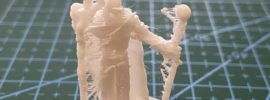
I downloaded it and set it to printing. Everything was going great and it looked like it was going to be a beautiful miniature. Then suddenly I come back and from the waste up, it was just a blob.
Ok, obviously my profile was messed up and I screwed this up. Let’s make some changes and do it again. It starts printing and I am happy because it looks great. It fails again with a blob of filament after the waist.
Ok, I obviously didn’t fix the problem, lets change some more settings. If you are here reading a blog about 3D printing, I am assuming you are smart enough to know what happens next. The same failed print.
I had printed this thing 3 times and it kept failing so I decided to print something I had already printed with the same profile to see if that was the problem. It printed fine. So imagine my surprise when I figured out, just because it is on thingverse.com doesn’t mean it is a good model.
I put it aside and went on printing other things.
About a week later, I came across a reddit post talking about netfabb. This is a free online service that “fixes” bad stl files. I have no idea what it does to them, but I thought I would give it a try. I uploaded the stl and tried to print the fixed stl file. It finally printed.
So know this, not all models we download are actually good no matter how good the non printed example looks. It may just be a crap model and you shouldn’t chase your profile settings to fix it.